
Family entertainment centre software.The track, the arena, the lanes and the party room, on one board.
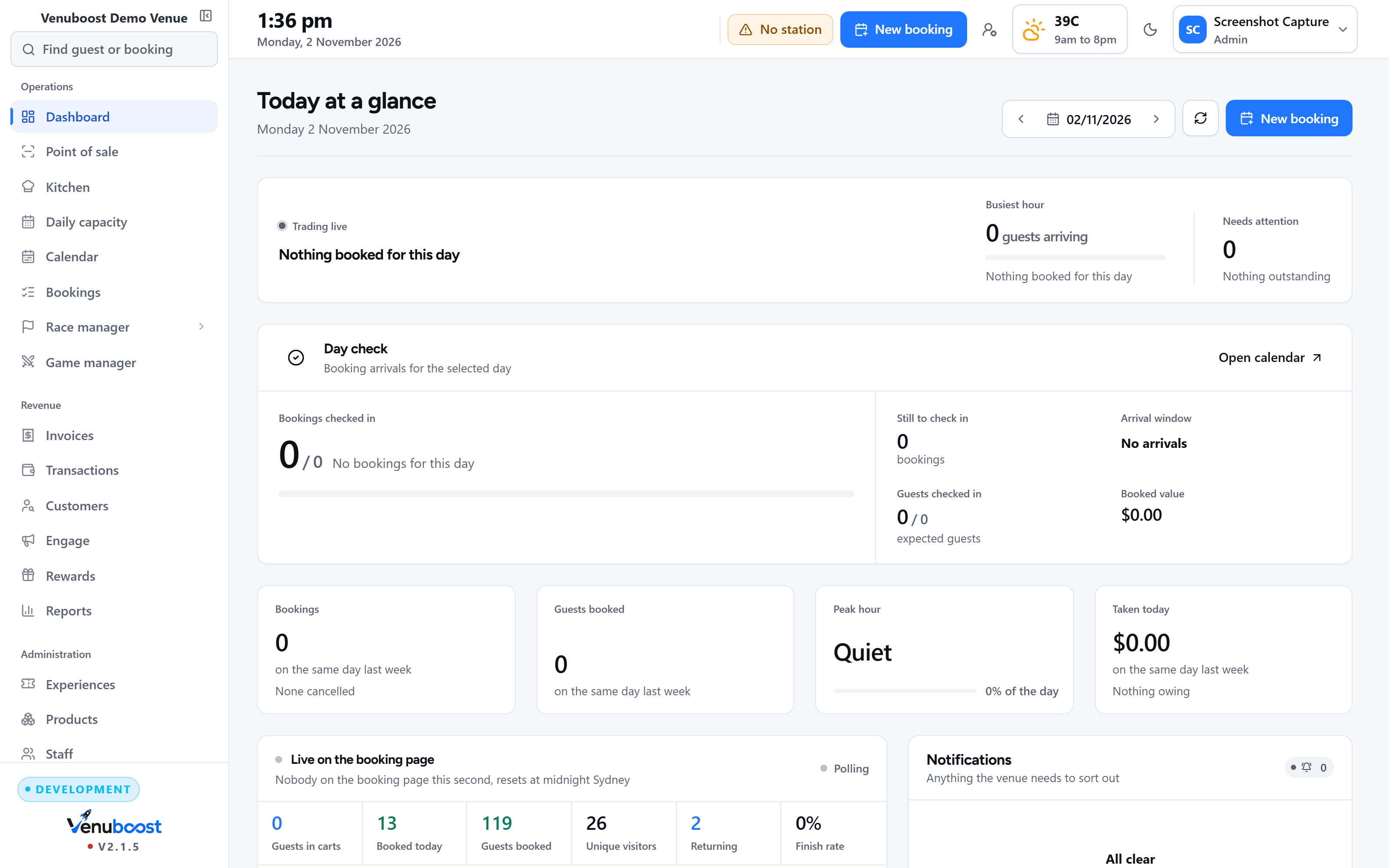
A family entertainment centre sells several activities that each run to their own clock, and the money is in the families who do two or three of them in one visit. Venuboost takes the booking, the waiver, the counter, the kitchen and the screens for all of them, in one system, so nobody on the floor is copying a name from one screen to another.
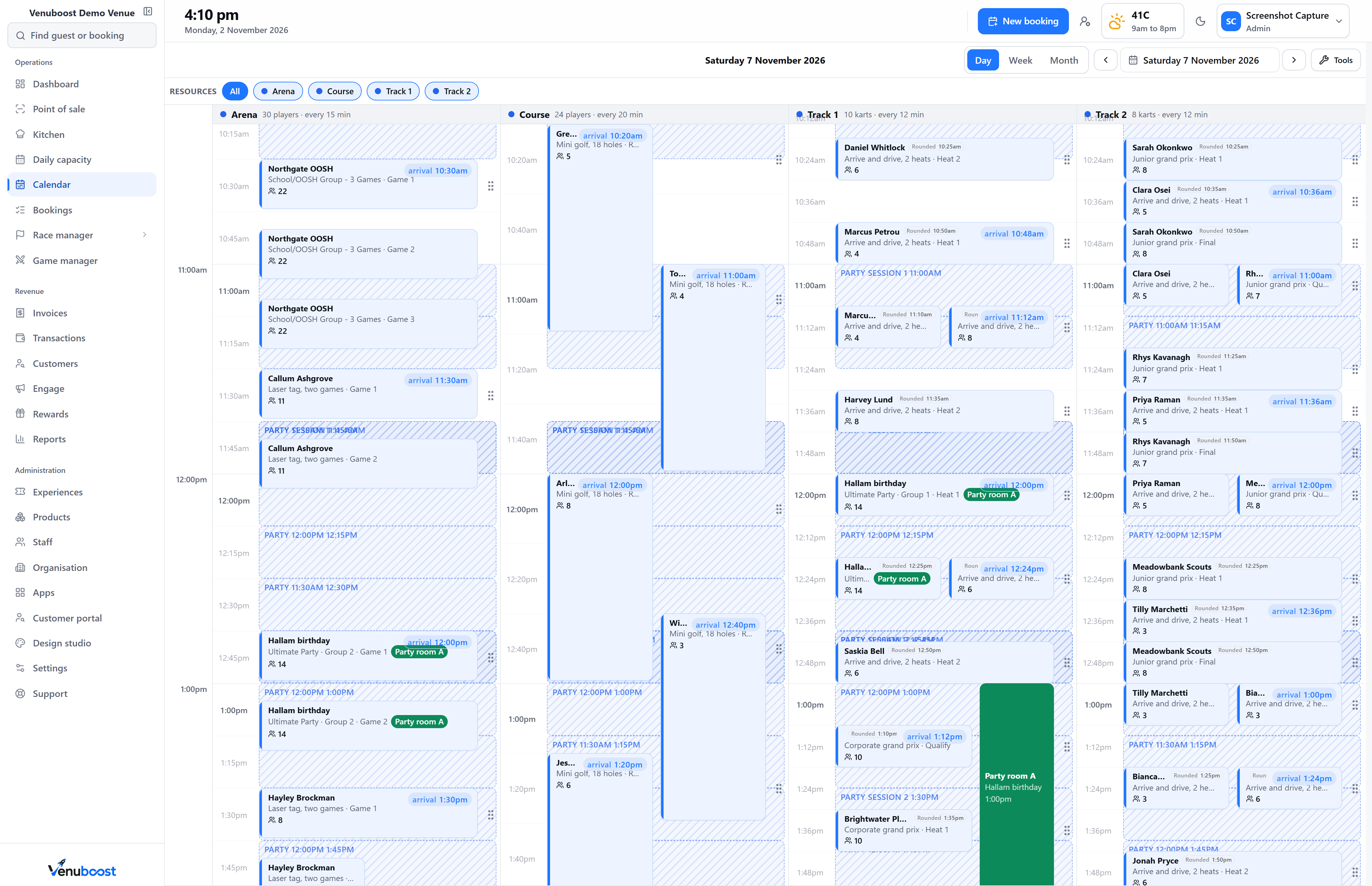
Why entertainment centres outgrow their software
Three activities, four systems and somebody copying names between them.
Most family entertainment centres grew one activity at a time. The track came with its own timing program, the laser arena came with a booking widget, the cafe came with a till, and the waivers live in another product again. Each one works on its own. The trouble starts on a busy Saturday, when a party of twenty wants an hour in the arena, two races and pizza, and three people at the counter are checking three screens to see whether that is possible.
In Venuboost every activity is a resource on the same board, with its own session length, its own capacity and its own rules. The booking page, the counter, the kitchen and the screens all read from that board, so a seat sold online is gone at the counter the same second, and a party's food is in the kitchen's timing as soon as they check in.
A Saturday, start to finish
The bookings are already in
Families booked on your own page through the week, some paying in full, some a deposit. The board shows every activity's sessions and what is left in each.
Doors open
Guests scan the code in their confirmation at the counter and are checked in. Anyone who did not sign their waiver at home does it at the kiosk by the door.
A party of twenty two arrives
Two groups taking turns on the track, then the laser arena, then the party room. Their pizzas reach the kitchen in time for them to sit down.
The walk ins peak
The counter sells the next free session, a round of slushies and a gift voucher on one sale, and the session fills on the board at the same moment.
Cash up
The drawer is counted note by note, the difference shows itself, and the day's figures are waiting in the owner's reports.
Scheduling every activity
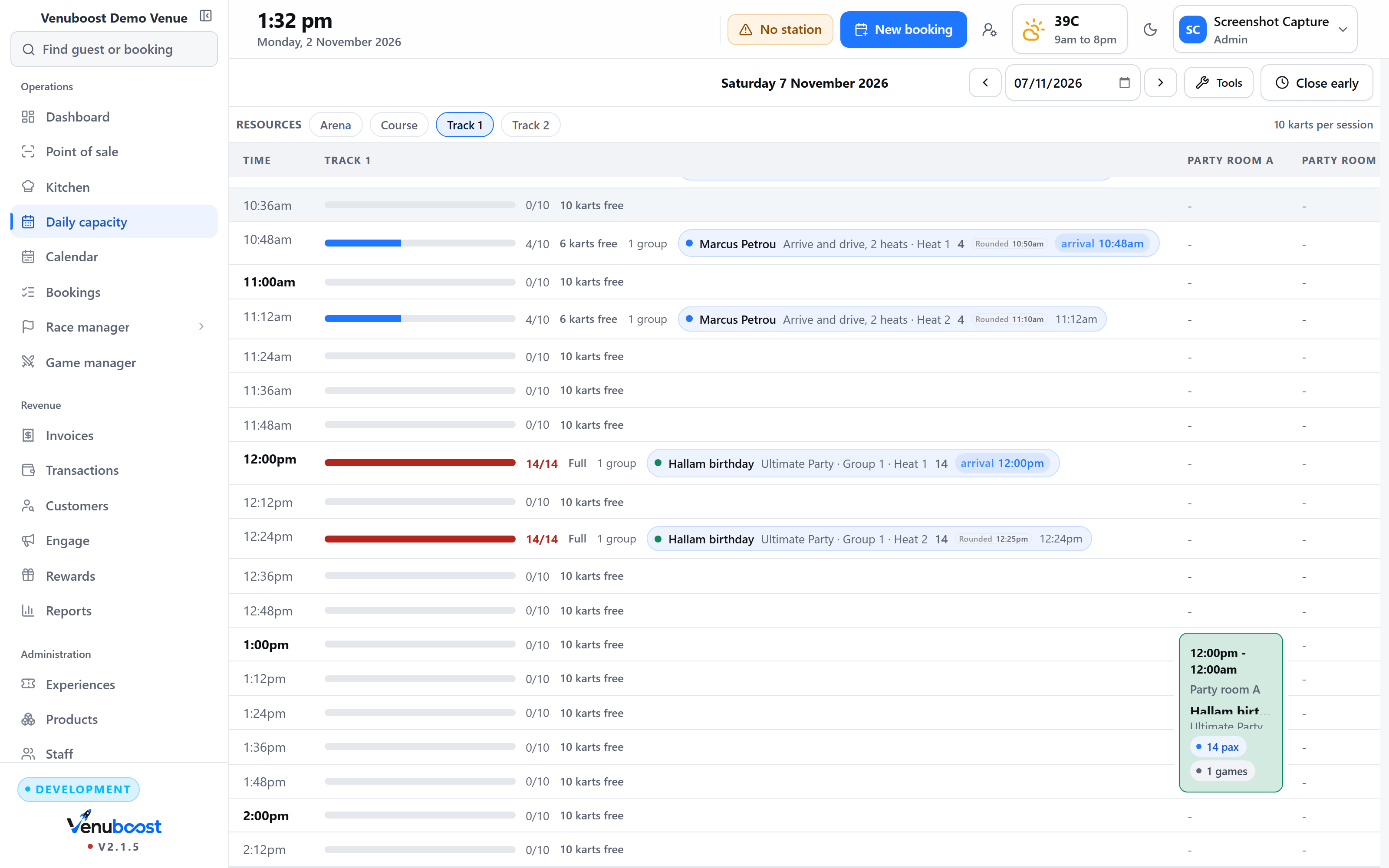
Twelve minute heats and twenty minute games on the same afternoon.
A kart track runs short heats on a fixed rhythm, a laser arena runs longer games with a briefing in front of each, and bowling lanes sell by the hour. Each resource in Venuboost keeps its own session length and its own capacity, so the board never offers a time the floor cannot run. When a group is bigger than one session, the engine splits it into turns and keeps the break between each group's turns inside the minimum and maximum you set.
- Each activity on its own interval and capacity
- Large groups split into turns automatically
- Combos that walk a family from one activity to the next
- Party rooms held for the minutes they are used
Online bookings
Booked at eleven at night, on your own page.
Guests book on a page carrying your venue's name and colours, with live availability for every activity and every package you sell. Take the full amount or a deposit per experience. The confirmation carries the waiver link, reminders go out by email and text, and the booking lands on the same board the counter is selling from.
- Live availability across every activity
- A deposit or full payment, set per experience
- Age and group size limits shown before anybody pays
- A slot held while the guest pays, and released if they walk away
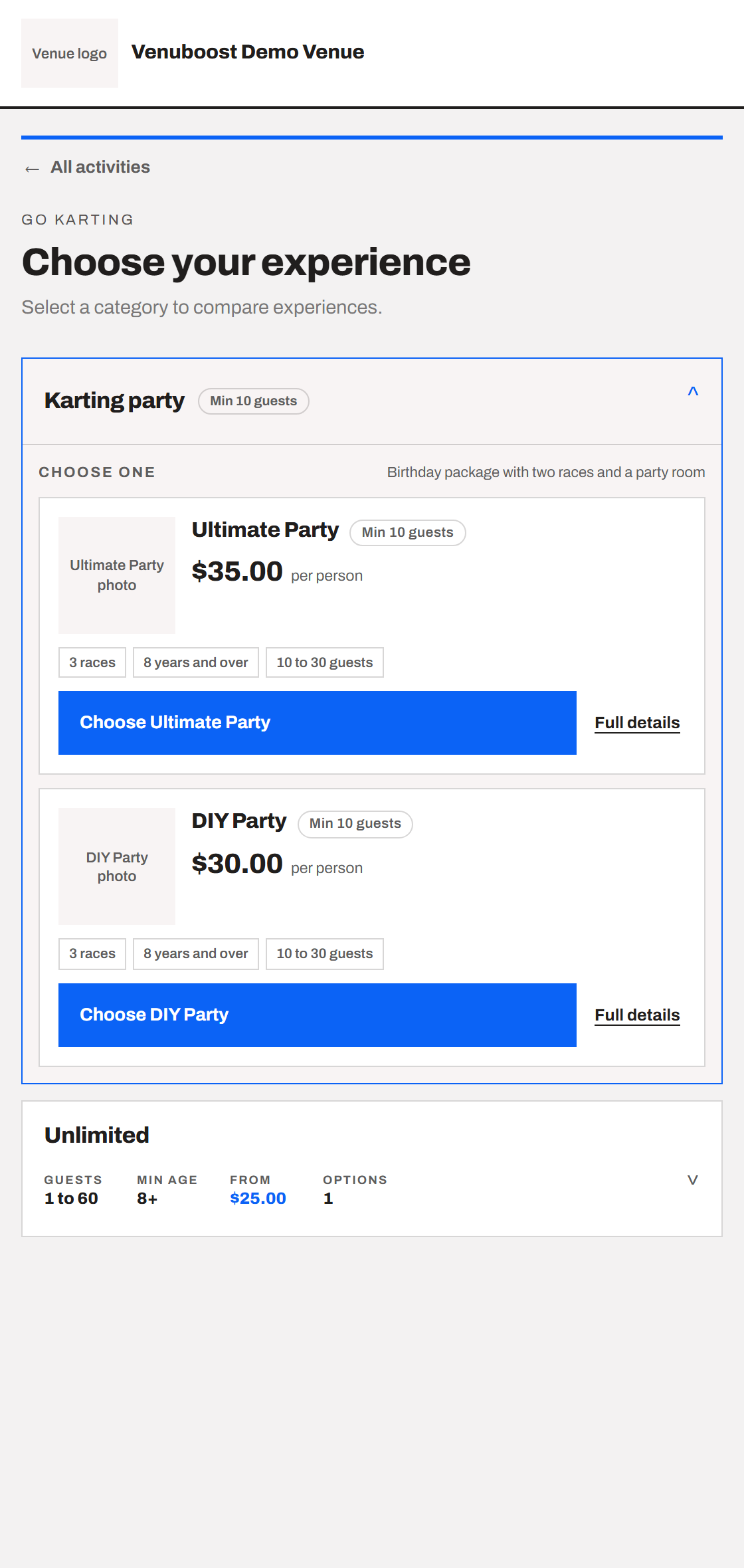
More on deposits, combos and the booking page on the online booking software page.
Birthday parties
The host picks the pizzas before the party, from a link.
Parties are where an entertainment centre makes its weekend, and where the Friday phone calls come from. In Venuboost, the host gets a link before the day to confirm how many kids are coming, choose the pizzas and add extras. The changes land on the booking, so the counter is not writing numbers on a whiteboard and the kitchen knows what it is making.
On the day, the party is two groups on the track, a game in the arena and an hour in the room, in one booking with times on it. Parents sign for their own children ahead of time, so the check in is helmets and wristbands rather than forms.
Waivers
Every guest signed, before the activity starts.
The waiver link goes out with every booking, and each guest signs on their own phone. A parent or guardian signs for children, and a signed waiver stays valid for the number of months you set, so a regular does not sign again every visit. A guest who did not get to it at home signs at a kiosk or a tablet by the door, and the signature is matched to the booking.
Each activity can carry its own waiver, so the trampoline wording does not have to cover the kart track. The full detail is on the digital waivers page.
The counter and the kitchen
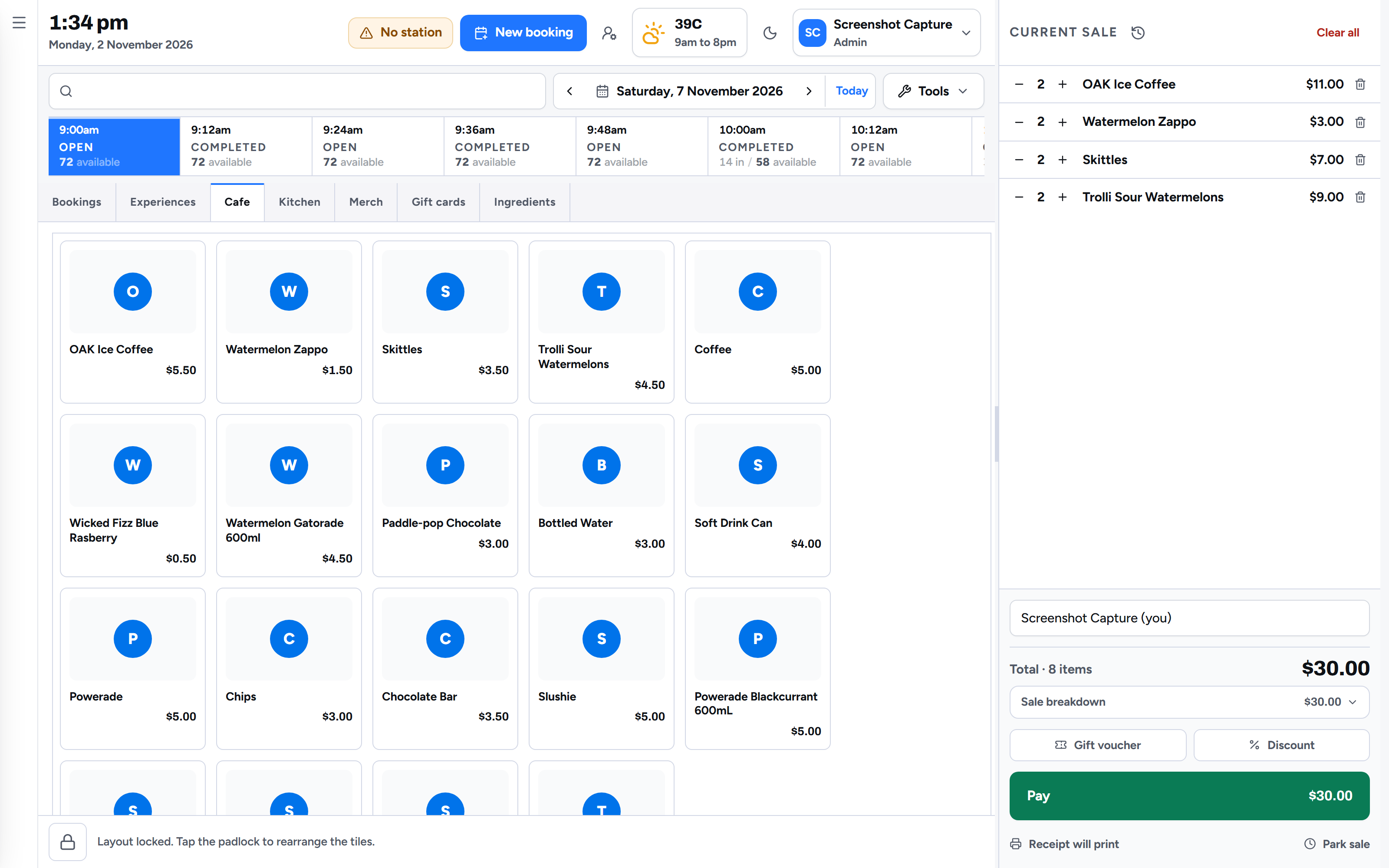
One till for the activities and the cafe.
The day's sessions sit along the top of the till, so a walk in buys the next free session and a drink on one sale. A booking code scanned at the counter checks the family in with what they paid online already off the total. Bills split evenly, by guest or by amount, and a parent who is not at the counter can be sent a pay link.
Food goes from the till to the kitchen screen with the guest's choices on it, each item to its own station. A burger with a recipe takes its bun and patty off stock as it sells, and anything at its reorder level is waiting on the next purchase order. The venue POS system page covers the till in full, and card terminals from Stripe, Adyen, Square, Clover and Linkly are on the venue payments page.
Screens and kiosks
The waiting area knows who is up next.
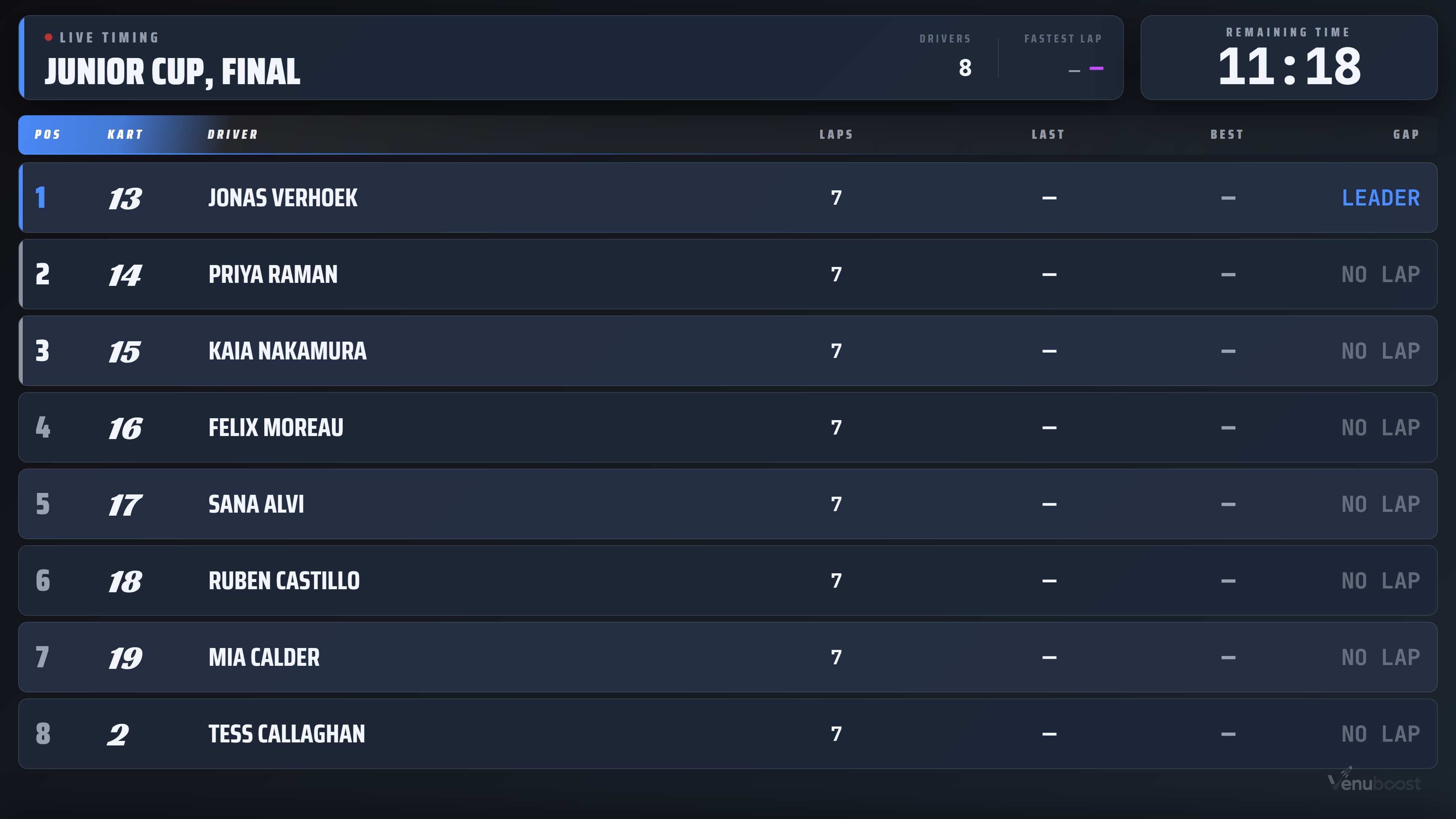
Venucast runs the televisions around your centre from inside Venuboost: the sessions coming up, live lap times during a race, the fastest drivers of the day and the safety briefing film. Screens on the venue network are served by Venubridge, so a film plays from the machine in the office rather than over the internet. A kiosk by the door lets a walk in check in and sign without joining the queue. All of it is on the screens and kiosks page.
Bringing families back
Points for regulars, and a message to the families who have not been in since winter.
Every guest has one record with their visits, waivers, payments and notes on it. Regulars can be marked as VIP for a discount at the counter, and reward points are earned on what they actually spend, with the value of a point and the tiers set by you. Campaigns go out by email or text under your venue's own name, to the guests you choose, with unsubscribes handled for you.
Schools and companies can be invoiced, part paid and chased from the same booking, and the invoice goes out as your venue's document rather than ours.
Reports and more than one site
Which activity carried the weekend, in the owner's inbox on Monday.
Takings by payment type and merchant account, sales by experience and by product, sales by staff member, where the bookings came from, and the busiest days and hours, each compared with the period before. Tax is shown on its own line, and gift voucher balances still owed to guests sit on the same sheet. Reports print, download as a document or go straight to an inbox.
An owner with more than one centre switches between them from the same sign in. Each venue keeps its own activities, prices, staff and merchant account, so a sale at one site is paid into that site's bank.
Every part of Venuboost
The activities and features behind a family entertainment centre.
Questions
What entertainment centre owners ask us first.
What is family entertainment center software?
Family entertainment center software, often called FEC software, is the system an entertainment centre runs its whole day on: online bookings for every activity, birthday parties, waivers, the front counter till, the kitchen, the screens on the walls and the reports. Venuboost puts all of those in one product, so a booking made online is the same record the counter, the kitchen and the activity staff are looking at.
What is the difference between FEC software and a booking widget?
A booking widget sells a time and a number of people. FEC software also has to know that the laser arena takes twenty players and the track takes ten karts, split a party of thirty into groups that take turns, collect a waiver from every guest, sell food and drinks at the counter, and send the party's pizzas to the kitchen. Venuboost does all of that against one board, so nothing is sold twice.
Can one booking include karting, laser tag and food?
Yes. A combo experience in Venuboost chains activities together and the booking engine places each one against real availability, with the gaps between them inside the limits the venue sets. The guest gets one booking with times on it, and any food ordered with it goes to the kitchen.
How does Venuboost handle birthday parties?
A party is booked online or at the counter like any other experience, with the party room held for the minutes it is used. Before the day, the host gets a link to confirm guest numbers, choose the pizzas and add extras, so the counter is not chasing numbers by phone on the Friday. Every child's waiver can be signed by a parent ahead of time.
Can guests sign waivers before they arrive?
Yes. The waiver link goes out with the booking and each guest signs on their own phone, with a parent or guardian signing for children. Signed waivers stay valid for the number of months the venue chooses, and anyone who did not sign at home can do it at a kiosk by the door.
Is there entertainment centre management software that runs more than one venue?
Venuboost does. An owner with more than one venue switches between them from the same sign in, and each venue keeps its own activities, prices, staff and merchant account, so money from one site never lands in the other's bank.
How long does it take to move to Venuboost?
There is no server to buy. The venue software runs in a browser, and Venubridge, a small app on a computer at the venue, connects printers, cash drawers, screens and any timing hardware on your network. Customers and forward bookings from your current system are brought across during onboarding, so the first day is not an empty system.
Bring us your busiest Saturday and we will build your centre on the screen.
Your own activities, your own party packages and your own prices, set up in front of you. You will see the board, the till and the kitchen ticket before we talk about what it costs.