
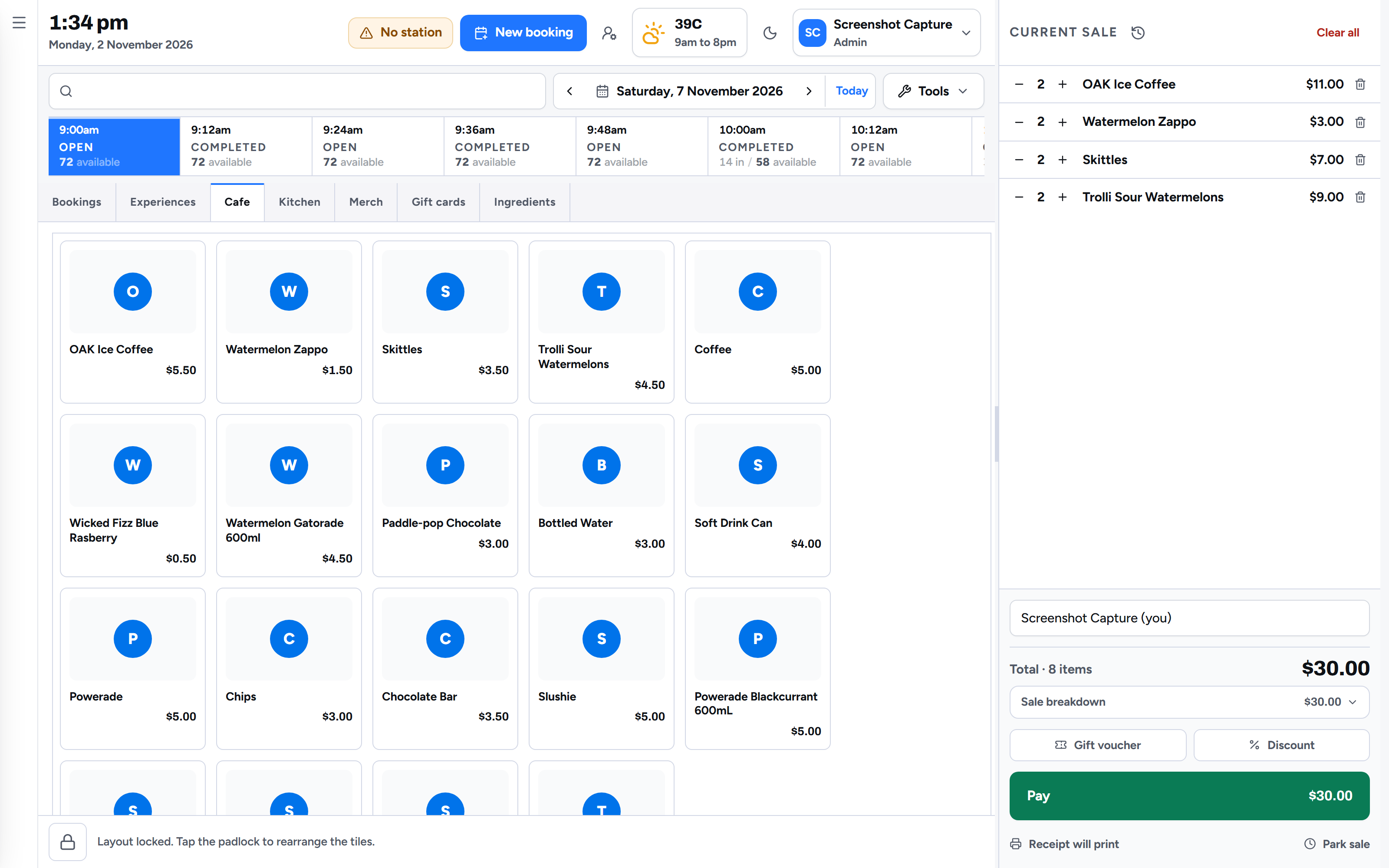
Venue POS system for entertainment centres.The next heat, two hot chips and a slushie, on one sale.
The counter at an entertainment centre sells time as well as things. Venuboost puts the day's sessions, the bookings arriving and the cafe on one till, so the person serving can check in a party, sell a walk in the next race and ring up the drinks without switching screens or typing anybody's name twice.
Why a cafe till falls short
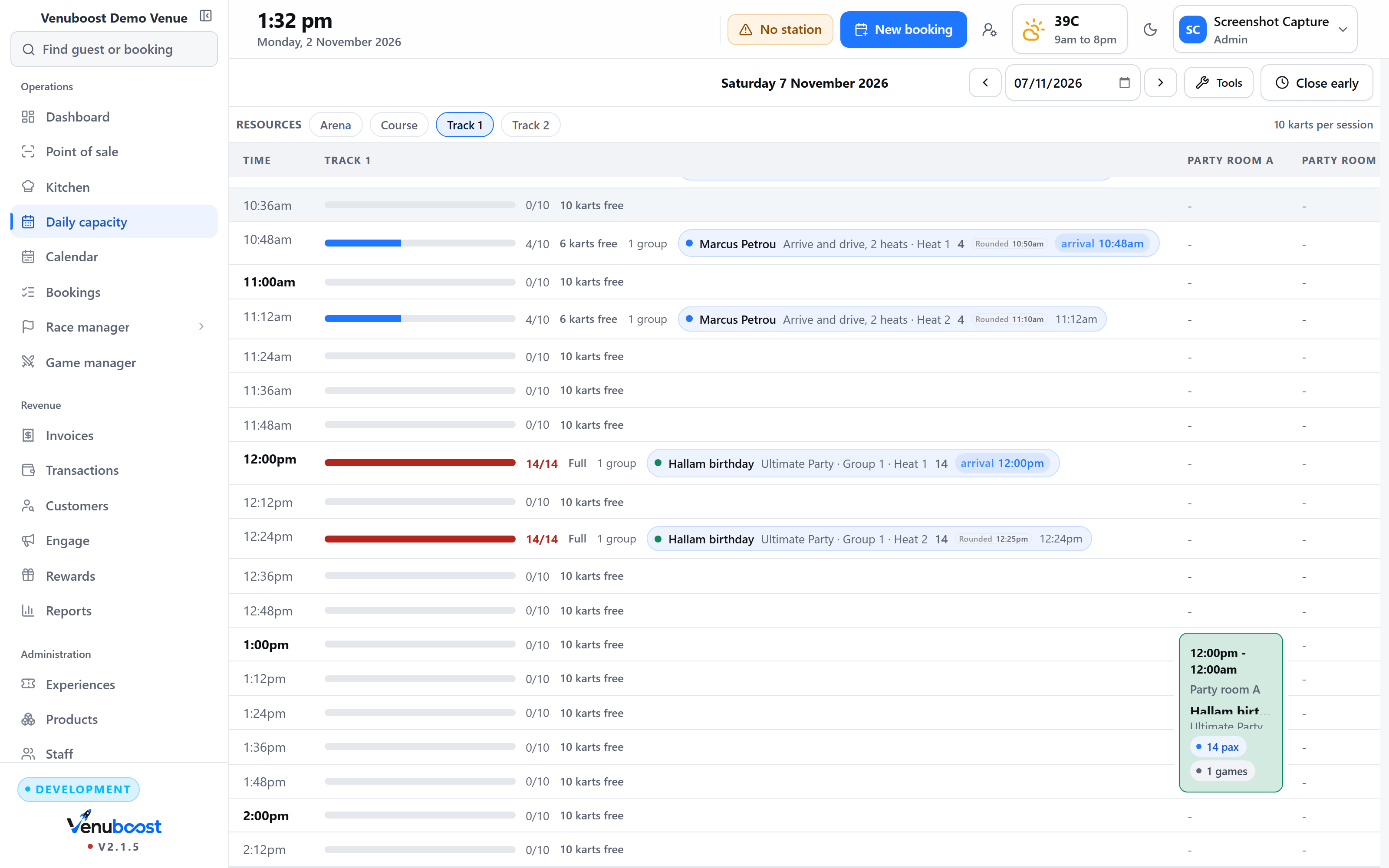
A kart track or a laser arena sells something that runs out at a set time.
A cafe till knows how many pies are in the warmer. It has no idea that the two o'clock heat has three karts left, that the family walking in booked online last night, or that two of their kids have not signed a waiver. So most venues end up with a booking system on one screen and a till on another, and a staff member reading a booking reference off one and typing a total into the other while the queue gets longer.
In Venuboost the till and the booking system are the same thing. The sessions along the top of the till are the same sessions the website sells, counted against the same capacity. A booking scanned at the counter is checked in on the spot, with what they paid online already off the total. Whatever is still owing, and whatever they add, goes on one sale.
Activities at the counter
Sessions sold against the same capacity the website sees.
Tap a session time and the till shows what is left in it. A walk in buys the next race or the next game, and it lands on the day board in the same motion, so the counter cannot sell the seat a guest is paying for online at that moment. Group rates price themselves as the group gets bigger, and the waiver state for every guest sits on the booking where the counter can see it.
- The day's sessions along the top, with the space left in each
- Booking QR codes scanned at the counter check the guest in
- Tickets scanned at the counter, with the uses left shown
- A camera or a barcode scanner, whichever the counter has
Food and drink
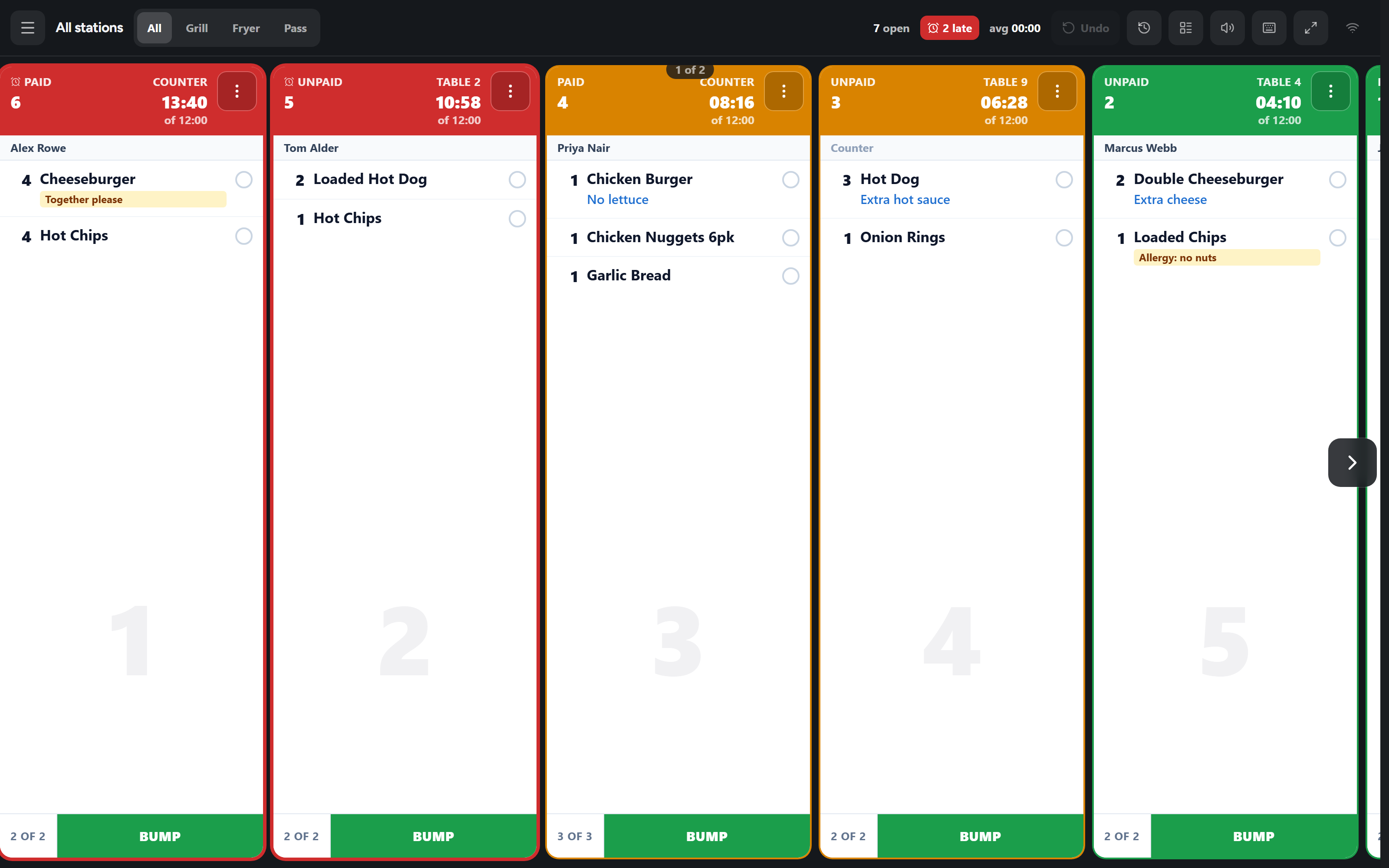
Burgers with no pickle reach the grill as ordered.
A product with choices opens a sheet of them when it is tapped: no pickle, extra sauce, cooked medium. The price of an extra goes onto the line, and the choices travel with it to the kitchen ticket and the receipt. A note typed at the counter, such as a nut allergy, goes on the ticket in the kitchen's words rather than in a code.
- Choices with their own prices and minimums
- Kitchen notes printed on the ticket
- Each product sent to its own kitchen station
- Food on a party booking joins the same kitchen rail
Stock
The buns come off the shelf when the burger is sold.
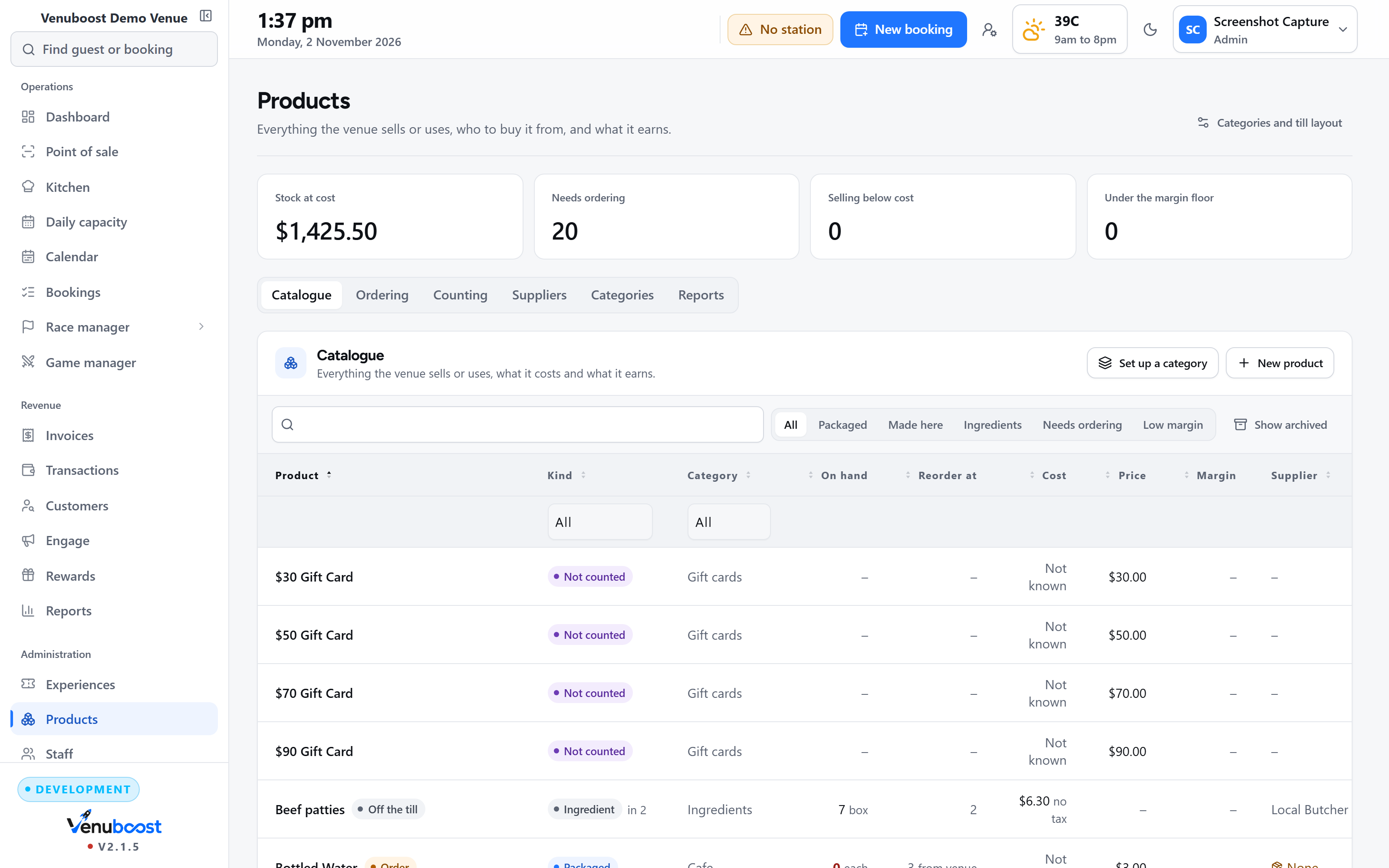
Every product can carry a stock count, a supplier, a cost and a reorder level. A burger made from a recipe takes its bun, its patty and a fiftieth of a bottle of sauce off stock each time it is sold. When an item reaches its reorder level it is already on the next purchase order for its supplier, in the supplier's own units, so four cases are ordered rather than ninety six cans.
- Recipes in portions, so a sauce bottle is reordered when it is actually empty
- Purchase orders that build themselves from what is short
- Stocktakes counted while the till keeps trading
- Ingredients that never appear on the till
Paying
Card terminals from the provider your business already uses.
Card payments at the counter go through a terminal from Stripe, Adyen, Square, Clover or Linkly, paired to the till and paid into your own merchant account. Most Australian venues already have Linkly behind their EFTPOS terminal, and Venuboost talks to it over the cable through Venubridge first, which takes a few milliseconds, and falls back to Linkly Cloud if the cable is not there. Staff do not change a setting when the line drops.
A tip a guest adds on the terminal is recorded against that card payment and shown on its own in the reports, because it belongs to the staff rather than the venue. Cash totals round the way your country rounds them. A sale can also go on account against an invoice, or be marked as nothing due when it was covered somewhere else. More on the providers and the countries they cover is on the venue payments page.
The moments that hold up a queue
The party of twelve who want to pay four ways
Split the sale evenly, by guest, or by an amount somebody calls out. Each part keeps its own method, so two cards, cash and a gift voucher all sit on one receipt.
The parent who is still in the car park
Send them a pay link by text or email and park the sale. The till goes back to the queue, and the parked sale watches for the payment on its own.
The power cut halfway through a card payment
With Linkly, the till asks the terminal what happened when it next opens. If the money was taken it is waiting against the next sale, so nobody is charged twice.
The till left open while the counter runs to the track
The screen locks itself after the idle time you set, and opens again with a staff PIN. Every sale records who rang it up.
The voucher from last Christmas
Type or scan the code and the balance comes off the bill. A voucher past its date can still be honoured, but a manager has to say so with their PIN.
The refund at closing time
Find the payment in transaction search and refund it in full or in part. The refund goes back through the provider that took the money.
Regulars and rewards
The regulars get their price without asking.
A guest marked as VIP gets their discount at the till, either from their tier or set on their own record, and you decide whether staff need a PIN to apply it. Points are earned on what is actually paid, never on a gift voucher being bought, and staff can spend them as money on a sale up to the share you allow.
Discount codes are taken at the counter. Gift vouchers sell as a line on any sale, and one handed over at the counter is typed or scanned and taken off what is owing. Only what the bill needs comes off the voucher, so a guest who takes a drink off the order keeps the rest of their balance.
End of the night
Cash up by shift, against a counted drawer.
The cash up runs for the full day, the morning or the evening. Staff count the drawer note by note, the float is recorded, and the difference between what the till expects and what is in it shows on the screen before anybody goes home. The summary prints on the counter printer.
The cash drawer opens from the till over the venue network through Venubridge, so it springs when the button is pressed rather than a few seconds later. A screen turned towards the guest can show the sale being built line by line in your own colours and logo. The reports then break the day down by tender, product, staff member and hour, with tax shown on its own line.
Reporting
What sold, who sold it and when the counter was busiest.
Takings by tender and by merchant account, products and experiences sold, sales by staff member, and the busiest days and hours, compared with the period before. Gift voucher sales, redemptions and the balance still owed to guests sit on the same sheet. Reports print, download as a document or go to an inbox.
The rest of the venue behind the till
Questions
What venues ask about the till.
What is a venue POS system?
A venue POS system is the till at the front counter of an entertainment centre. Unlike a cafe till, it has to sell timed activities such as a kart race or a laser game against live capacity, check in guests who booked online, and sell food, drink and merchandise on the same sale. Venuboost does all of that on one screen, against the same bookings your website sells.
Which card terminals does the Venuboost POS work with?
Venuboost takes card payments at the counter through Stripe, Adyen, Square, Clover and Linkly terminals, paid into the merchant account your business already holds. Linkly is the EFTPOS middleware most Australian venues already have behind their terminal, and Venuboost talks to it over the venue network first, falling back to Linkly Cloud if the cable is not there.
Can a go kart track sell races on the same till as food and drink?
Yes. The day's session times sit along the top of the till, so a walk in can buy the next heat, a drink and a pair of gloves on one sale. The race lands on the same board the online bookings use, so the counter can never sell a kart that has already gone.
Can a group split the bill at the counter?
Yes. A sale can be split evenly, by guest, or by a typed amount, and each part keeps its own payment method and its own line on the receipt. A parent who is not at the counter can be sent a pay link by text or email, and the sale is parked while they pay so the next guest can be served.
Does the POS send food orders to the kitchen?
Yes. Food rung up at the till goes to the kitchen screen with the choices the guest made, such as no pickle or cooked medium, and any note typed at the counter, such as an allergy. Each product can be sent to its own station, so the grill sees burgers and the bar sees shakes.
Does the Venuboost POS track stock?
Yes. Products carry stock counts, suppliers, costs and reorder levels. A burger with a recipe takes its bun, patty and a portion of sauce off the shelf when it is sold, items at their reorder level appear on a purchase order for their supplier, and stocktakes can be done while the till is still trading.
Bring us your menu and your busiest session, and we will set up the till.
Your own products, your own prices and your own terminal, on the screen in front of you. You will see a split bill, a pay link and a kitchen ticket before we talk about what it costs.